
Back to blog
Product2 min readSeptember 15, 2025
vizrm release — September 2025: Redesigned View Settings
View Settings have moved in-context, grouped by how you actually think about the data. Less clutter, clearer controls.
Jakob Porer
Co-Founder & CTO
We've redesigned the View Settings interface in vizrm to give you a faster, more intuitive way to tailor how you see org charts and account structures. Whether you're preparing for a leadership review, deep-diving into stakeholder relationships, or sharing views with your team, these new controls make it easier to surface exactly what matters.
What Changed With This Release
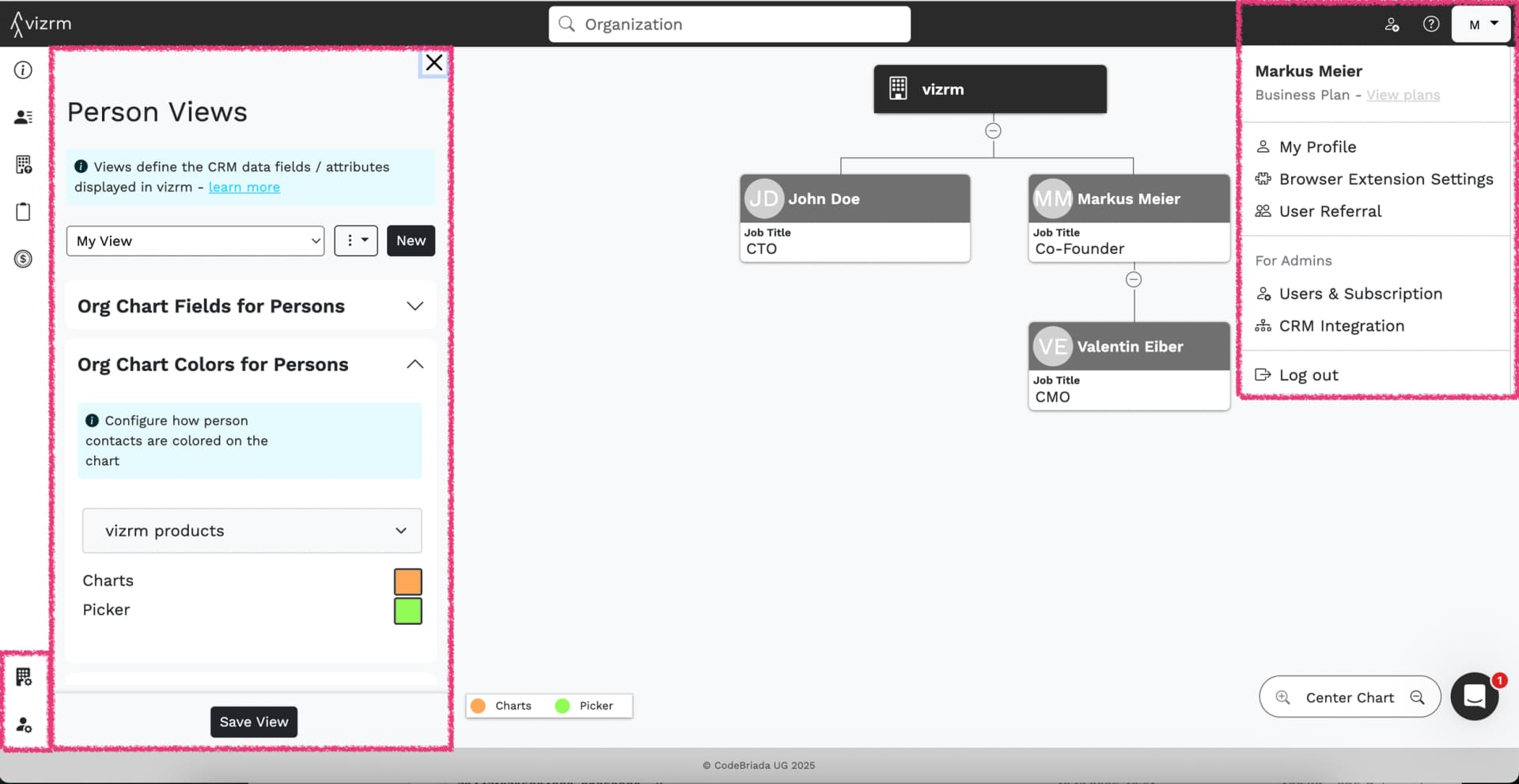
- Chart View Settings Moved In-Context — All chart configuration settings have been moved to the left-side chart details panel, where they belong — only visible when an org chart is loaded.
- Clearer Organization of Chart Settings — View controls are now grouped by how users naturally think about data: Organization Data (hierarchy, departments, reporting lines) and Contact Data (contact fields, roles, CRM attributes).
- New Account Menu (Top Right) — The gear icon has been replaced with an account icon. It now includes only account-related actions: account settings, user management, and log out.
The Benefits
- Clear separation between account management and chart configuration
- Settings appear only when relevant, reducing clutter
- Terminology now matches real user mental models: Organization vs. Contact data (instead of Chart vs Sidebar view)
See how the org chart comes together in vizrm.