
LinkedIn integration
Add contacts from LinkedIn without leaving your workflow.
Capture the people you meet on LinkedIn straight into your CRM - matched, de-duplicated and logged automatically through the vizrm browser extension.
LinkedIn · Profile + extension
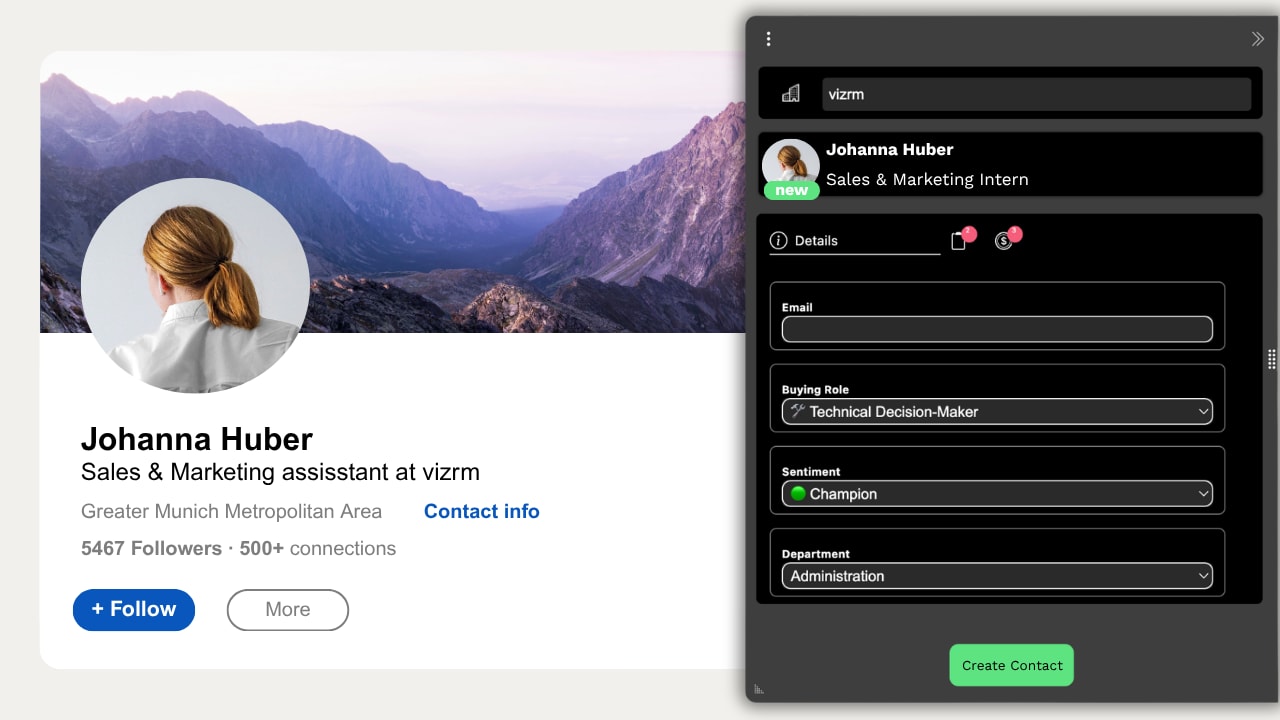
Everything the extension does on LinkedIn
Five jobs, one widget. No tab switching.
01Basic
Create new contacts
On any LinkedIn profile not yet in your CRM, the widget shows a create option. One click pulls name, title, company and profile URL into HubSpot or Pipedrive.
Name, title, company and profile URL in one click
Auto-linked to the matching CRM organization
Create new contacts
What LinkedIn sync saves you
Cut the copy-paste between LinkedIn and your CRM, and log outreach without breaking your flow.
Add a LinkedIn contact to HubSpot or Pipedrive in one click - duplicate-free.
Track messages and connection requests as CRM activities automatically.
Keep contact records current without manual data entry.
The seamless integration between LinkedIn and Pipedrive has made our sales process more efficient and effective.
 Mark GordonHead of Business Development · Net1.ie
Explore the rest of vizrm
Org chart builderBuild living account maps inside your CRM.See full details Org chart analyticsSee engagement gaps before deals slip.See full details HubSpot integrationLives inside HubSpot - no tab switching.See full details Pipedrive integrationLives inside Pipedrive, in the sidebar.See full details
Capture every LinkedIn contact - inside your CRM.
Install the vizrm extension and add contacts in one click.
Free to install · No credit card required · HubSpot & Pipedrive