
Account mapping in Miller Heiman, Challenger, Sandler and SPIN
How six sales methodologies classify the people in a deal - and how to turn that into two custom fields in HubSpot or Pipedrive that your whole team actually uses.

Every sales methodology worth reading agrees on one thing: in a complex deal you are not selling to a company, you are selling to a group of people who disagree with each other. Where they differ is what to call those people.
Miller Heiman says Economic Buyer. Challenger says Mobilizer. Sandler says Decision-Maker. They are describing overlapping groups with different vocabulary, and if you have ever tried to standardise account mapping across a team where three people trained on three different systems, you will have run into this.
This is a practical reconciliation. Six methodologies, what each one actually says, and the two custom fields we recommend setting up in HubSpot or Pipedrive so that everyone maps accounts the same way.
The short version
Account mapping tracks two separate things, and most teams collapse them into one field by mistake:
Decision-making role - what a person formally does in the buying process. Do they hold the budget, use the product, check the security questionnaire, control the calendar?
Position towards you - what that person thinks of you. Are they advocating internally, quietly supportive, undecided, or working against you?
These are independent. A Technical Buyer can be your strongest champion or the reason you lose. An Economic Buyer can be entirely neutral. Track them in one field and you lose the ability to answer the question that actually matters in a deal review: who has power, and are they on our side?
Most of these people turn up on LinkedIn before they turn up in the CRM, which makes this a LinkedIn CRM integration problem as much as an account mapping one.
How six methodologies classify contacts
The same handful of people turn up in every framework. Only the labels change.
- Holds the budget - Economic Buyer (Miller Heiman); Decision-Maker (Sandler, SPIN, Solution Selling, SNAP)
- Lives with the solution - User Buyer (Miller Heiman); End User (Sandler, Solution Selling); Problem Holder (SPIN)
- Checks it against requirements - Technical Buyer (Miller Heiman); Technical Gatekeeper (Solution Selling); Gatekeeper (SNAP)
- Sways the decision - Coach (Miller Heiman); Teacher (Challenger); Influencer (Sandler, SPIN, Solution Selling); Key Influencer (SNAP)
- Drives the change internally - Mobilizer and Go-Getter (Challenger)
- Looks like progress but isn't - Talker (Challenger)
- Pushes back - Skeptic and Blocker (Challenger)
1. Miller Heiman Strategic Selling
The most structured of the six, and the one most other systems borrow from. Four roles:
- Economic Buyer - final authority over the budget. One per deal, usually.
- User Buyer - will live with the solution. Cares about whether it actually works day to day.
- Technical Buyer - checks the solution against requirements. Can't say yes, can say no.
- Coach - a trusted insider who tells you how the organisation really makes decisions.
The Coach is the role teams most often fail to fill, and the one that most reliably predicts whether a deal closes.
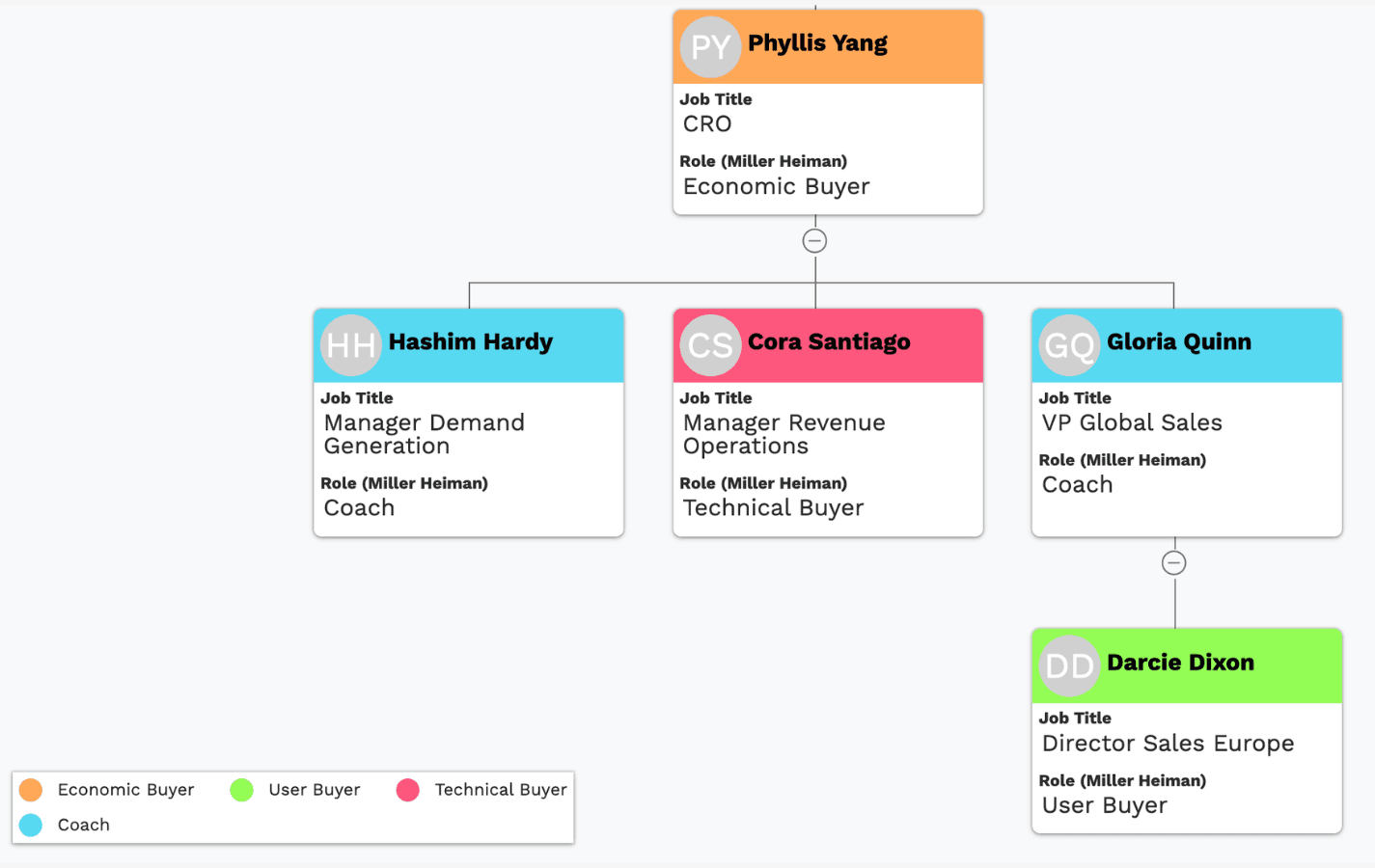
Source: Miller, Robert B., et al. The New Strategic Selling. Business Plus, 2005.
2. The Challenger Sale / The Challenger Customer
The follow-up book is the more useful one for mapping. It splits stakeholders by their appetite for change rather than their job title:
- Mobilizers - people who will drive the deal internally. Sub-divided into Go-Getters (proactive, want change), Teachers (influence others through insight), and Skeptics (challenge you hard, but their vetting makes the deal stick).
- Talkers - friendly, responsive, and unable to make anything happen. Easy to mistake for progress.
- Blockers - resist change or are loyal to an incumbent.
The Talker problem is the reason this framework earns its place. Most stalled deals have a Talker at the centre of them.
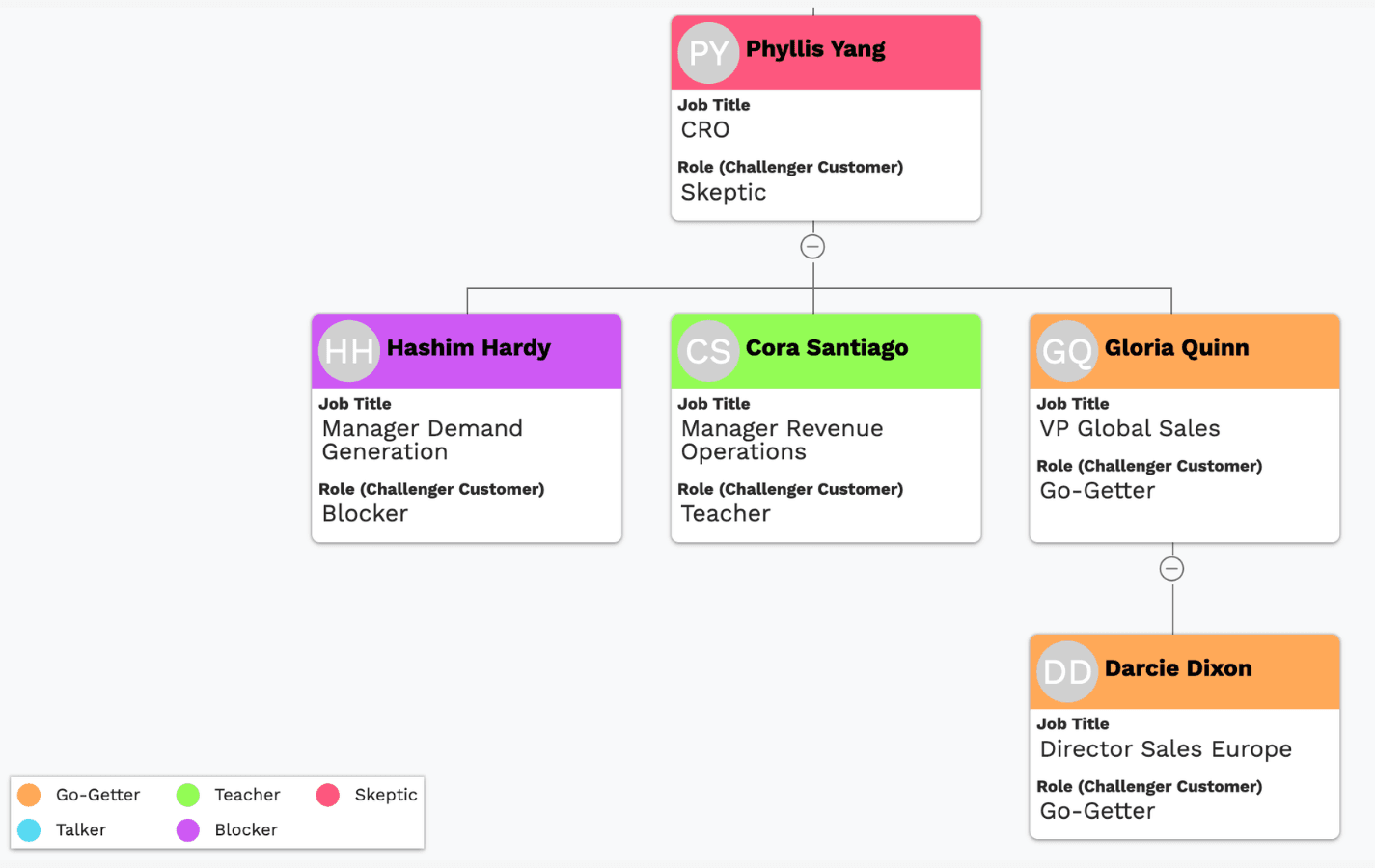
Source: Dixon, Matthew, and Brent Adamson. The Challenger Customer. Portfolio, 2015.
3. Sandler Selling System
Less rigorous about classification, more insistent on doing it early. Three roles: Decision-Maker, Influencers, End Users. Sandler's contribution is the discipline of establishing who can actually sign before you invest in the opportunity.
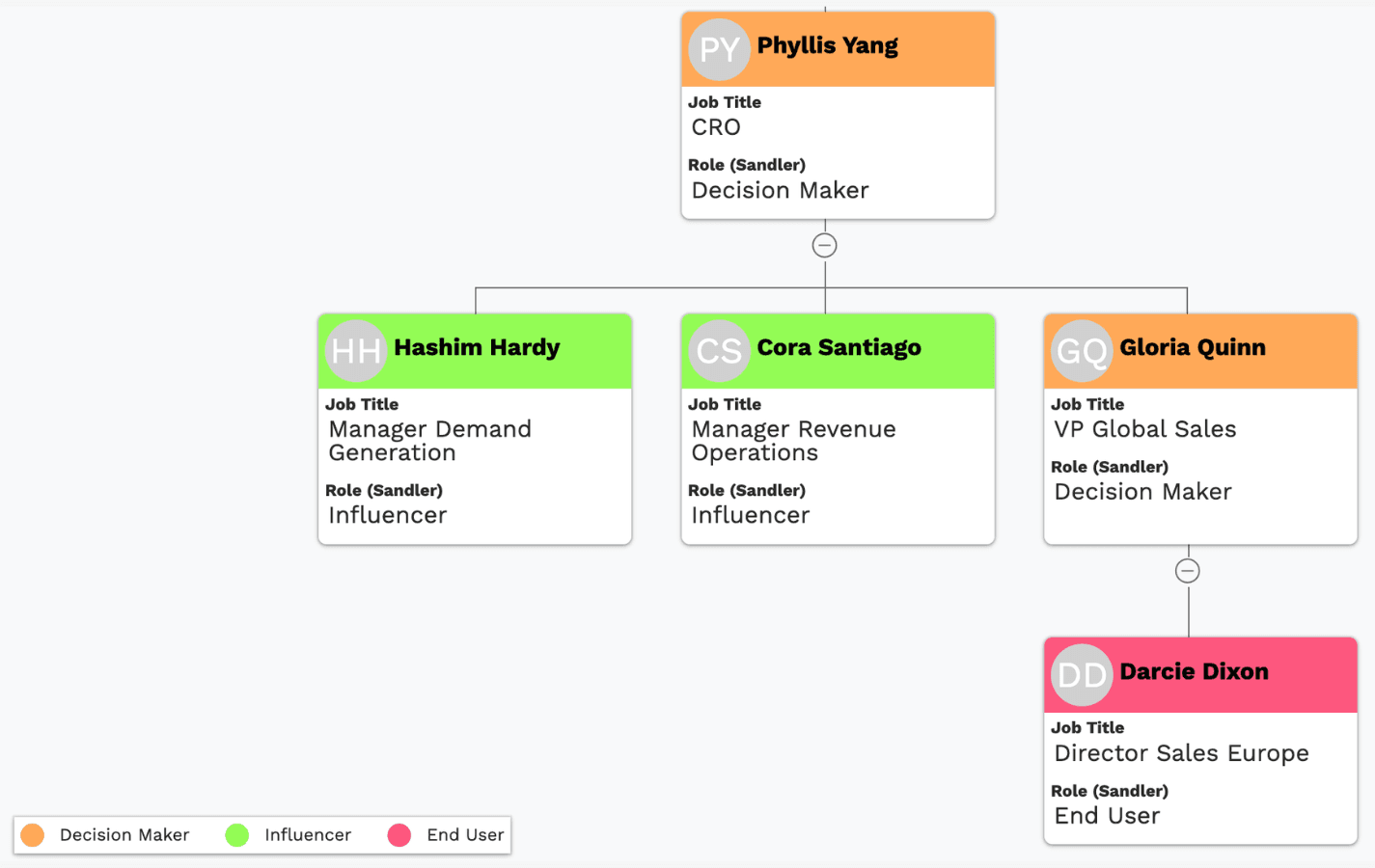
Source: Sandler, David. You Can't Teach a Kid to Ride a Bike at a Seminar. Sandler Training, 1995.
4. SPIN Selling
SPIN is a questioning framework, not a mapping one, but it implies three roles: Decision-Makers, Problem Holders, and Influencers. The useful idea is Problem Holder - the person who feels the pain most directly. They are often not senior, and they are usually your best route in.
Source: Rackham, Neil. SPIN Selling. McGraw-Hill, 1988.
5. Solution Selling
Organises people by their stake in the problem: Decision-Makers, Influencers, Technical Gatekeepers, End Users. Closest in structure to Miller Heiman, with more emphasis on the technical gate.
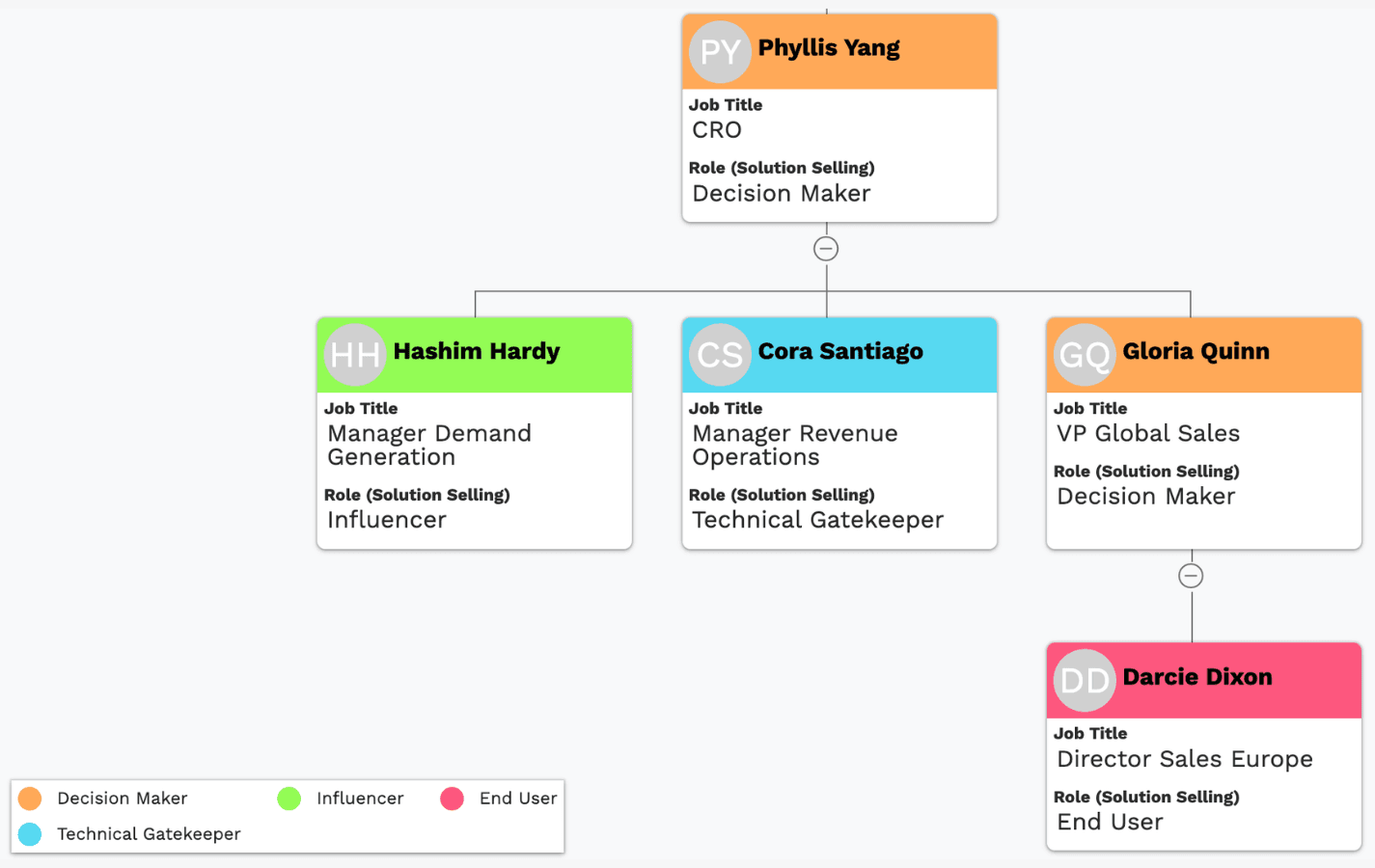
Source: Bosworth, Michael. Solution Selling: Creating Buyers in Difficult Selling Markets. McGraw-Hill, 1995.
6. SNAP Selling
Built for buyers who are overwhelmed. Three roles: Decision-Makers, Key Influencers, Gatekeepers. The emphasis on Gatekeepers - the people controlling access rather than the decision - is the part worth keeping.
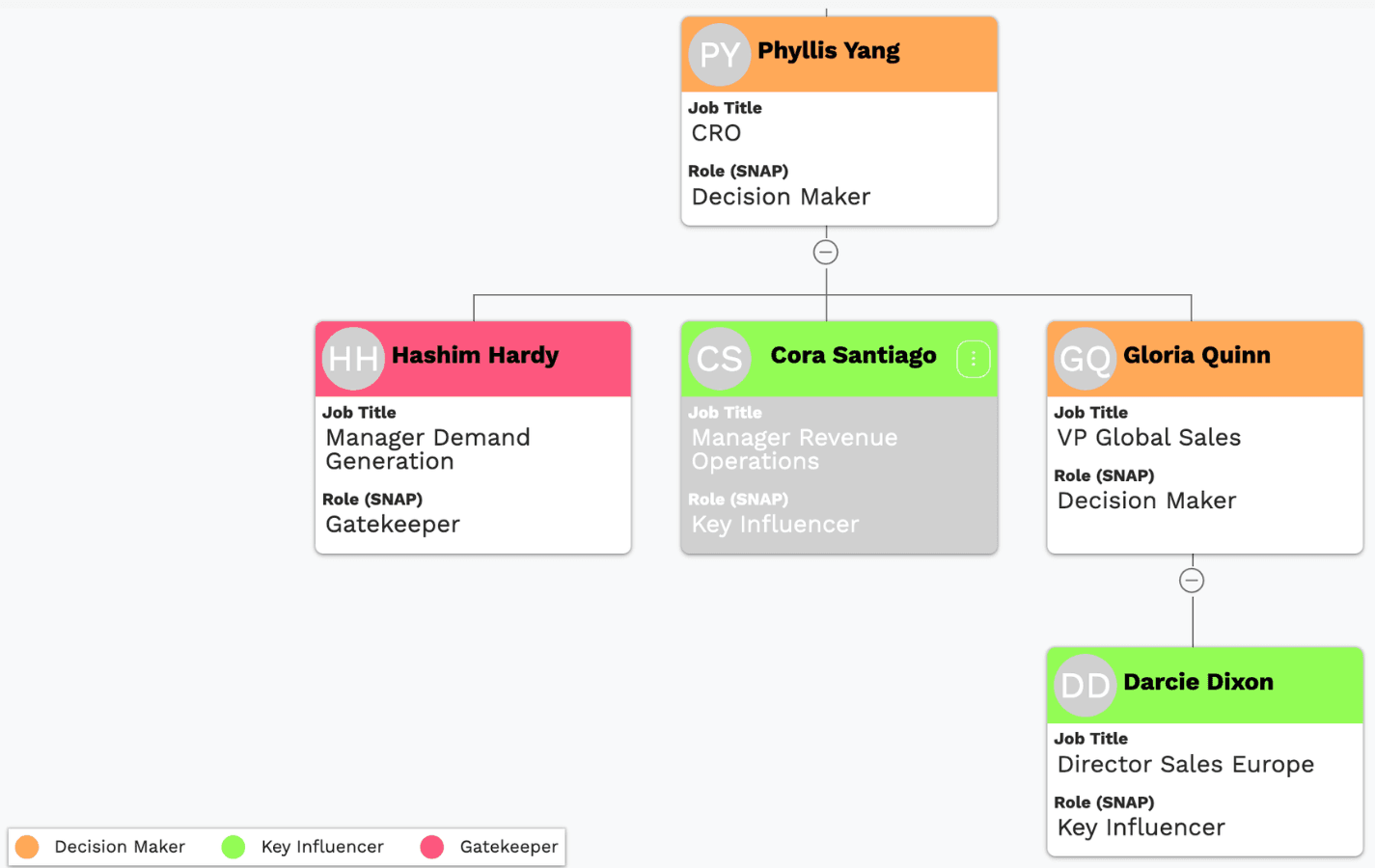
Source: Konrath, Jill. SNAP Selling. Portfolio, 2010.
The configuration we recommend
You do not need to adopt one methodology wholesale. We took the roles that appear across several of them and that reps can actually tell apart in practice, and reduced it to two custom fields.
Field 1 - Decision-making role. Emoji prefixes make the org chart readable at a glance, which matters more than it sounds when you're looking at forty contacts.
- 💰 Economic Buyer - allocates the budget, makes the final financial call
- 🛠️ Technical Decision-Maker - signs off on technical, regulatory or compliance fit (Technical Buyer / Gatekeeper)
- 🧑💻 End User - will use the product; cares about whether it works (User Buyer / Problem Holder)
- 📣 Influencer - sways decision-makers through expertise or trust (Key Influencer / Coach / Teacher)
- ⚡ Mobilizer - actively pushes the project forward internally (Go-Getter / Change Champion)
- 🤔 Skeptic - asks the hard questions; not an opponent (Critical Thinker / Challenger)
- ❌ Blocker - resists the change or backs a competitor (Opposition / Competitor Loyalist)
Field 2 - Position towards you. Four values, colour-coded on the chart:
- Champion - advocates internally, has influence, will tell you how to win
- Supporter - favourable, but won't spend political capital for you
- Neutral - engaged and undecided; winnable either way
- Blocker - actively resistant, whether from competitor preference, internal politics, or personal stake
Keeping these two fields separate is the whole point. Colour tells you where the goodwill is; the emoji tells you where the power is. A chart with green at the bottom and grey at the top is a deal you are going to lose, and you can see it in a second.
Setting it up
In HubSpot - create both as contact properties (dropdown select) on the Company record's associated contacts. In Pipedrive - create them as custom person fields.
Once the fields exist, add them to a custom view and vizrm renders them directly on the org chart: role as the emoji prefix, position as the node colour. Nothing is stored on our side - the values live in your CRM, so they stay available to your reporting and workflows.
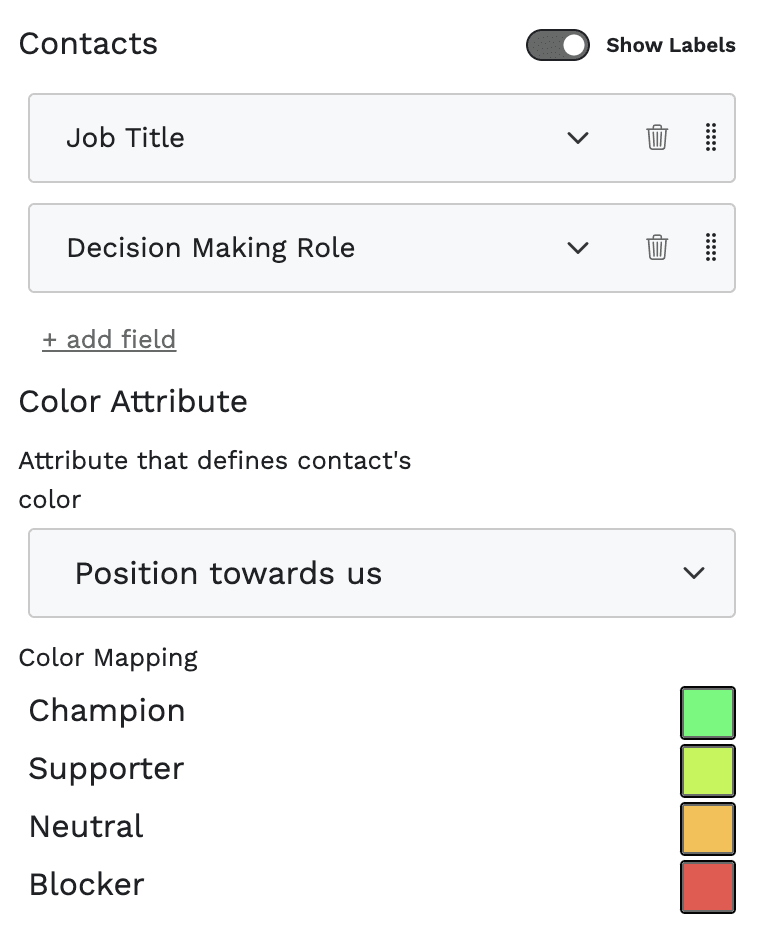
One tip worth the setup time: as a vizrm admin you can share a view as the team default, so every rep opens the same account map with the same methodology applied. Standardising the fields is only half the job; standardising what people see is the half that makes it stick.
Markus