
LinkedIn CRM integration: what it should actually do
Most LinkedIn CRM integrations stop at pushing a name into a contact record. Here are the five jobs a LinkedIn CRM integration has to do, and how HubSpot and Pipedrive handle each one.

You find the right person on LinkedIn. You read the profile, check who they report to, send a connection request, and start a conversation. Then you switch to your CRM to write it down, discover they are already in there under a different spelling of their name, and decide it can wait until Friday.
It never gets done on Friday. Six weeks later the deal needs a champion and nobody on the team can tell you who you were talking to.
That gap is what a LinkedIn CRM integration is supposed to close. Most of them close about a third of it.
What a LinkedIn CRM integration has to do
If you are searching for a CRM that integrates with LinkedIn, it is worth being specific about what you are asking for. There are five separate jobs hiding inside that phrase, and most tools do one or two.
- Create a contact from a profile. Name, job title, company and profile URL land in the CRM without retyping, attached to the right company record.
- Match and update an existing contact. The harder half. If the person is already in the CRM under an old job title, the integration should recognise them and update the record rather than create a second one.
- Log the conversation. Connection requests and messages become CRM activities, so the account history is complete without anyone copying a thread into a note.
- Work with deals from the profile. See which open deals a person is attached to, and attach them to one, while you are still on LinkedIn.
- Put the person somewhere useful. A contact record is a row. Selling into a 300-person company, you need to know where that row sits: who they report to, who influences them, and who else on your team already knows someone there.
Job five is the one almost nobody does, and it is the one that decides whether the other four were worth doing.
The three ways teams do it today
Manual copy-paste. Free, universal, and it stops the moment a quarter gets busy. The tell is a CRM full of contacts with no job title. If you cannot report on job titles, you cannot report on the buying committee, which means account reviews run on whoever remembers the most.
An automation platform. Zapier, Make or a similar tool moving records on a trigger. Fine for volume workflows like adding form fills to a list. Poor for this, because the work happens while a rep is reading a profile and deciding something. A background sync cannot ask "is this the same Sarah Chen?" and a rep who has left the tab cannot answer it either.
A browser extension. The integration lives on the LinkedIn page itself, in a panel next to the profile. The rep sees CRM state while looking at the person, and acts once. This is the only one of the three that solves job two, because a human is present at the moment of ambiguity.
Does HubSpot integrate with LinkedIn?
Partly, and the detail matters more than the headline.
HubSpot has a native LinkedIn Sales Navigator integration that shows Sales Navigator information inside the CRM record. It needs a paid Sales Navigator seat alongside your HubSpot seat. The genuine two-way contact sync, LinkedIn's CRM Sync, sits on Sales Navigator's top tier, which is priced for large sales organisations rather than for a team of fifteen reps.
So for most SMB and mid-market teams on HubSpot, the practical answer is that native LinkedIn contact capture is either absent or costs more than the CRM does. That is why the HubSpot marketplace has a whole category of extensions doing this job, including tools like vizrm that add org charts inside the HubSpot Company record.
Does Pipedrive integrate with LinkedIn?
Not natively. Pipedrive has no built-in LinkedIn integration, and Sales Navigator's CRM Sync does not cover Pipedrive. Every working Pipedrive LinkedIn setup is a third-party tool, and in practice that means a browser extension.
This is less of a disadvantage than it sounds. Because there is nothing native to work around, the extensions built for Pipedrive tend to do the full job rather than fill gaps around a partial native feature. vizrm, for example, runs in the Pipedrive sidebar as well as on LinkedIn.
What vizrm does on LinkedIn
The vizrm LinkedIn integration is a browser extension that puts a panel on the LinkedIn profile page, connected to your HubSpot or Pipedrive account.
- Create contacts. On a profile not yet in your CRM, one click pulls name, title, company and profile URL across, linked to the matching company record.
- Match and update. On a profile already in your CRM, the panel shows the existing record and lets you update a stale job title in place, without creating a duplicate.
- Track messages and connections. A checkbox on the LinkedIn message box and the connection request dialogue logs the exchange as a completed CRM activity.
- Activities and deals from the profile. See the open deals a person is attached to, log an activity, or attach them to a deal without leaving LinkedIn.
- Reveal email and phone. If you already pay for an enrichment tool, vizrm connects to it, so contact details appear in the same panel.
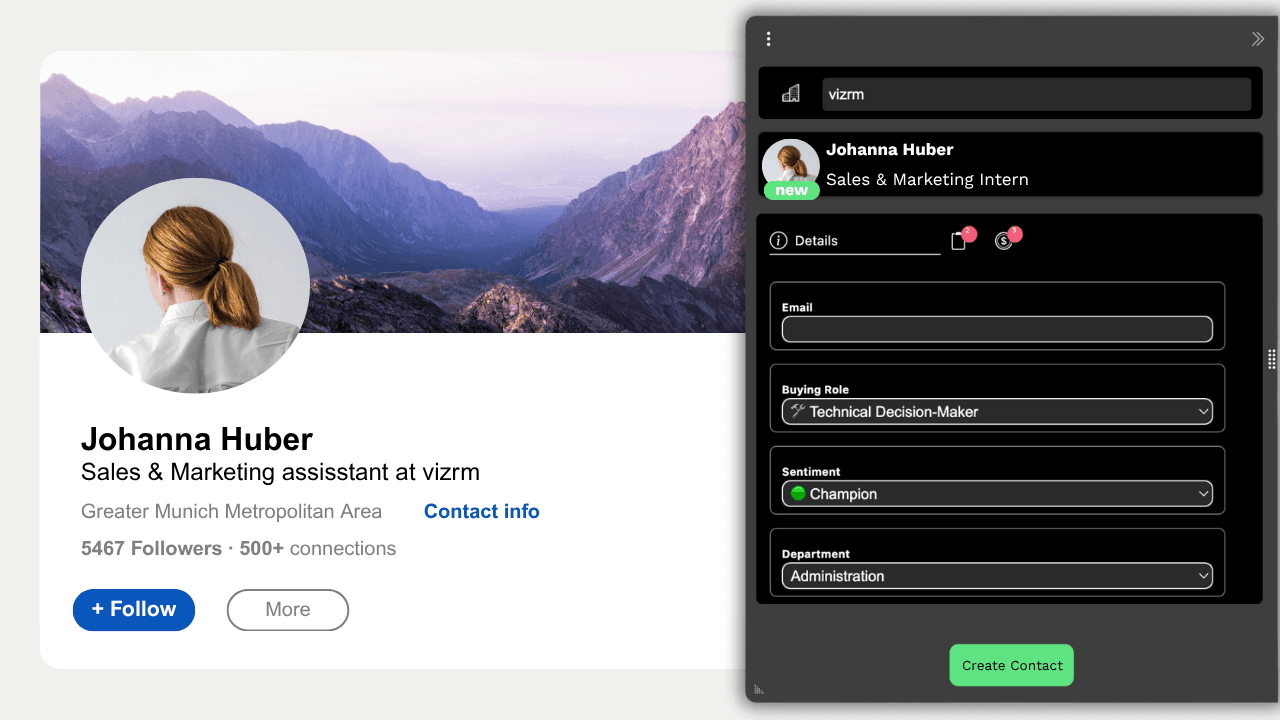
Nothing is stored outside your CRM. HubSpot and Pipedrive remain the record.
Adding the contact is the easy part
Here is the thing I would want someone to tell me before I picked a tool.
Every product in this category can get a name out of LinkedIn and into a CRM. That is table stakes, and if that is all you need, pick the cheapest one and move on.
But a rep adding contacts from LinkedIn is not collecting names. They are working out how a company makes decisions. The reason they looked up that VP is that someone in a meeting mentioned a name they did not recognise, and they need to know whether that person can stop the deal.
A CRM contact list cannot answer that. Eighty rows sorted alphabetically tell you nothing about who reports to whom, who has gone quiet, and which of the three people you are talking to actually signs.
That is why vizrm puts every contact you capture from LinkedIn straight onto the account's org chart inside HubSpot or Pipedrive. The chart shows reporting lines, buying roles and sentiment, and the Engagement Heatmap colours it by CRM activity so stakeholders nobody has contacted in a month stand out. The LinkedIn extension is the fastest way to fill the chart in. The chart is the reason to bother.
"We've been very happy with this integration, from account mapping to LinkedIn profile alignment and identifying the right stakeholders within opportunities." — Jason Krilich, VP of Sales, MetrixData360
Where to start
If you are on HubSpot or Pipedrive and evaluating this, the question to ask a vendor is not "can you add contacts from LinkedIn". They all can. Ask what happens to the contact after it lands, and whether anyone on your team will be able to read the account six months from now.
vizrm is free to install and there is a 14-day trial. Install the extension, open five profiles from an account you are working, and see what the chart looks like when you are done.