
Account mapping for B2B sales: how to map the buying committee on a real deal
A typical B2B deal has 6 to 10 decision makers. Here is how to map the buying committee on a real account: the roles to look for, formal power vs real influence, and how to keep the map current.

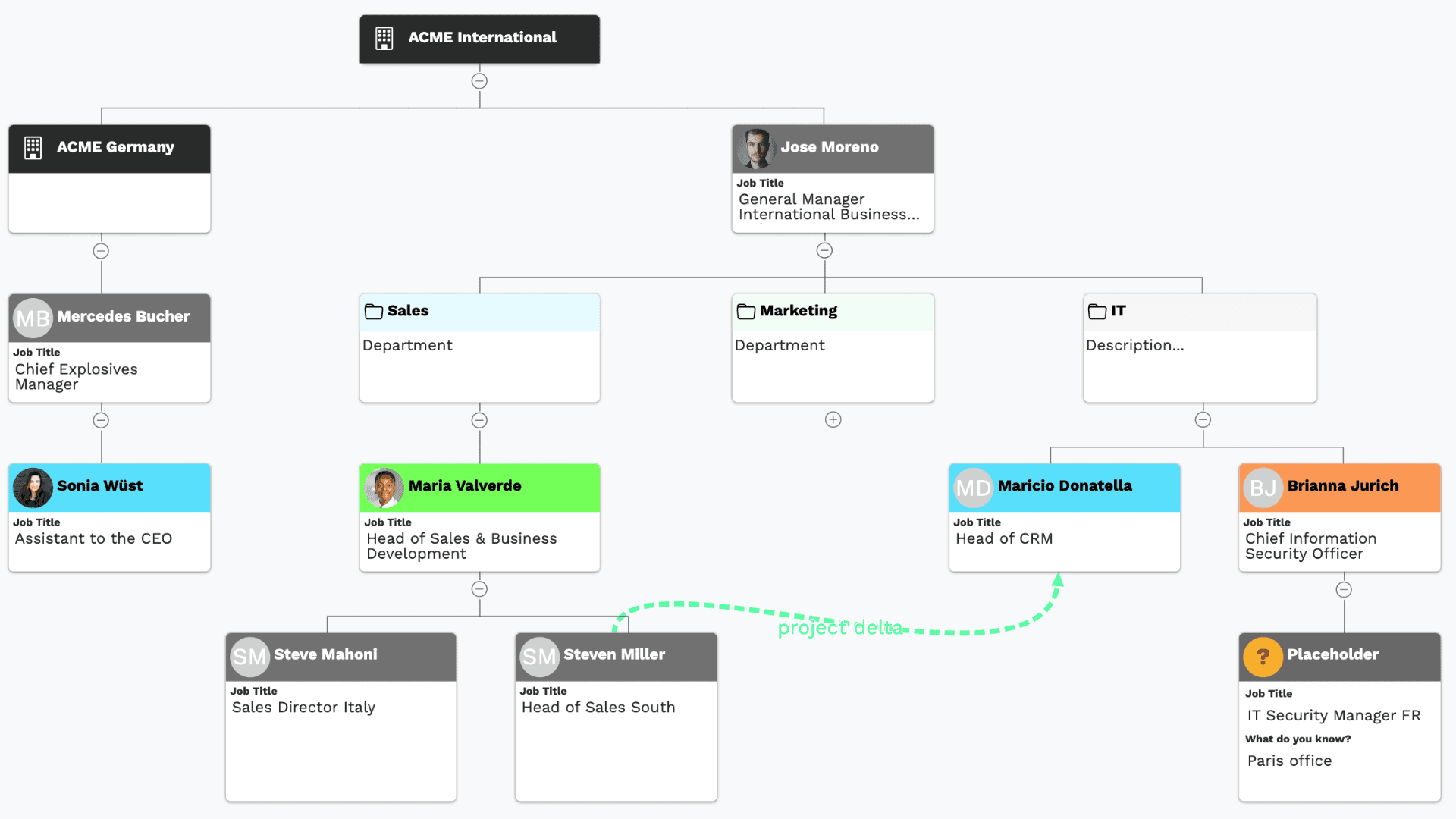
Most deals I have lost, I lost to someone I never met.
Not to a competitor with a better product. To a director of operations who was never on a call, who had an opinion about the incumbent vendor, and who said something in a meeting I was not in. By the time that opinion reached me it had already hardened into a decision.
That is the case for account mapping, and it has very little to do with drawing boxes.
This guide is about mapping your customer's organisation, the buying committee on your deal, not about charting your own sales team's reporting structure.
Why a contact list is not an account map
Your CRM already knows who you have spoken to. That is a record of your activity. It tells you nothing about how the account actually decides.
Gong analysed millions of sales interactions and found that closed-won deals include 67% more contacts than closed-lost deals. Gartner puts a typical enterprise B2B purchase at six to ten decision makers. Put those together and the picture is uncomfortable: the deals that close have more people in them, and most reps are working with a fraction of the committee without knowing which fraction.
An account map answers three questions a contact list cannot:
- Who is missing? Not "who have I emailed," but "which functions must sign off on a purchase like this, and have I met anyone in them?"
- Who actually decides? Job titles are a rough proxy for authority and a poor proxy for influence.
- Where am I exposed? If your only real relationship leaves the company next month, what happens to the deal?
Those are the questions that change what you do on Monday. Everything below is about answering them.
Power and goodwill: the two things worth mapping
Ignore the org chart for a moment and think about people. There are two questions you need to answer about each of them, and they are independent of each other.
What is this person's role in the decision? Do they hold the budget, sign off on security, use the thing every day, control who gets a meeting?
Where do they stand on you? Are they arguing your case internally, quietly in favour, undecided, or working against you?
Collapse those into one field and you lose the ability to answer the only question that matters in a deal review: who has power, and are they on our side? We wrote up how six different sales methodologies handle this, and the two custom fields we recommend setting up in HubSpot or Pipedrive to keep them apart.
The roles
- Economic Buyer. Allocates the budget and makes the final financial call. This is not automatically the CEO, and on mid-market deals it usually is not. It is whoever owns the number your product moves.
- Technical Decision-Maker. Signs off on technical, regulatory or compliance fit. Cannot say yes to the purchase. Can absolutely say no to it, usually late, usually in writing.
- End User. Lives with the decision. Rarely decides, and can kill a rollout months after the contract is signed.
- Influencer. No formal authority, high informal weight. The engineer everyone defers to. The ops manager who has been there fifteen years. These people are the reason account maps need lines that are not reporting lines.
- Mobilizer. Actively pushes the project forward inside the account. Sets up meetings, chases legal, keeps it on the agenda when everyone else is busy. Deals without one do not move on their own.
- Skeptic. Asks the hard questions. Worth naming separately because a Skeptic is not an opponent. Their scrutiny is what makes the decision stick once it is made, and reps write them off far too early.
- Blocker. Resists the change or backs the incumbent. Often it is not personal. They implemented the current system, or they carry the risk if the migration goes badly, or they simply have four other projects. Blockers rarely announce themselves. They surface as unexplained delays.
The positions
- Champion. Has influence, advocates internally, and will tell you how to win. The test is simple: has this person spent political capital on you? Set up a meeting, forwarded your business case, pushed back on a colleague? If not, they are not a champion yet.
- Supporter. Favourable, responsive, pleasant to deal with, and unwilling to spend anything on your behalf. This is the most dangerous category on the chart, because a supporter feels like progress. Most stalled deals have one at the centre.
- Neutral. Engaged and undecided. Winnable either way, and the group where your effort has the highest return.
- Blocker. Actively resistant, whether from competitor preference, internal politics, or a personal stake in the status quo.
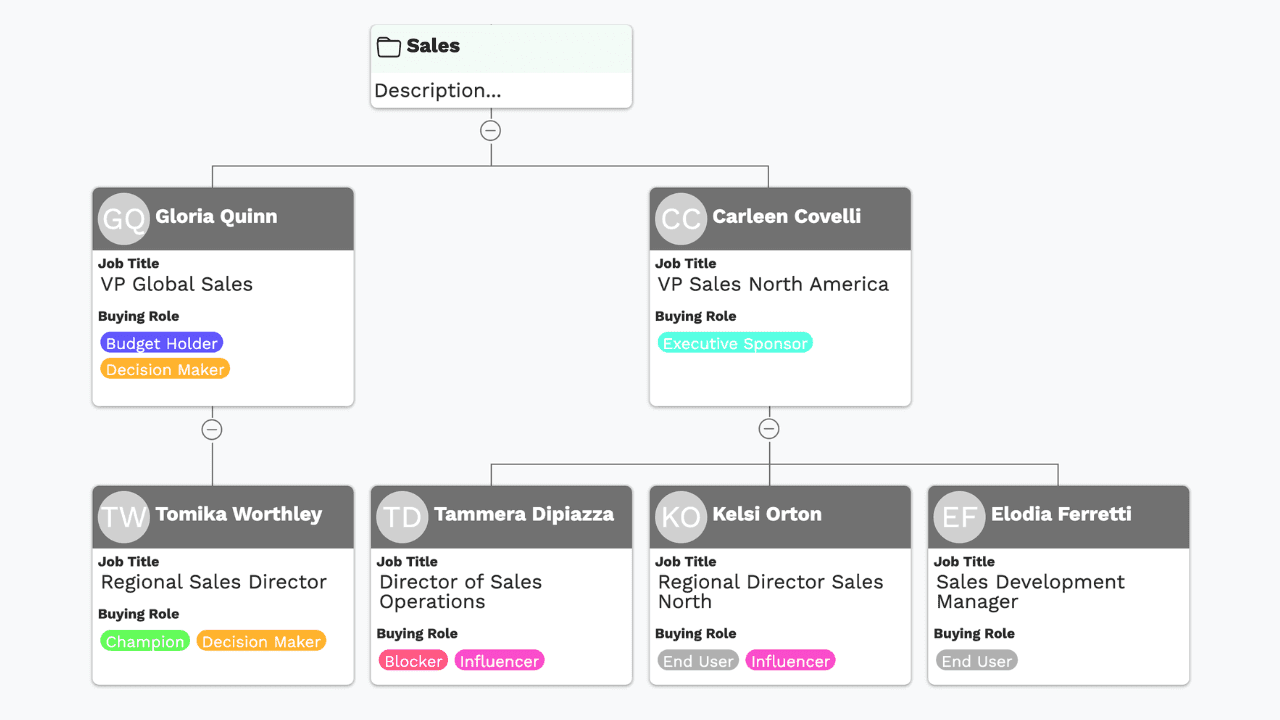
One person carries one role and one position, and the combinations are what tell you where you are. An Economic Buyer sitting at Neutral is the most important gap in your deal. A Skeptic who is also a Champion is the best thing that can happen to you. And a chart with goodwill at the bottom and nothing at the top is a deal you are going to lose, which you can see in about a second once the two are mapped separately.
Formal hierarchy is the map. Influence is the terrain
Here is where most account maps stop being useful. They render the reporting structure accurately and then imply that decisions flow down it. They do not.
The reporting line tells you who signs. The influence line tells you who decides what gets signed. On complex deals the second matters more, and it is invisible in any data source you can buy.
"It's really important to understand the political game and the relationships. It's easier to do business with clients when we know the relationships between people. My team absolutely loves vizrm." — Clément Carrasqueira, Global Account Manager, Opteamis
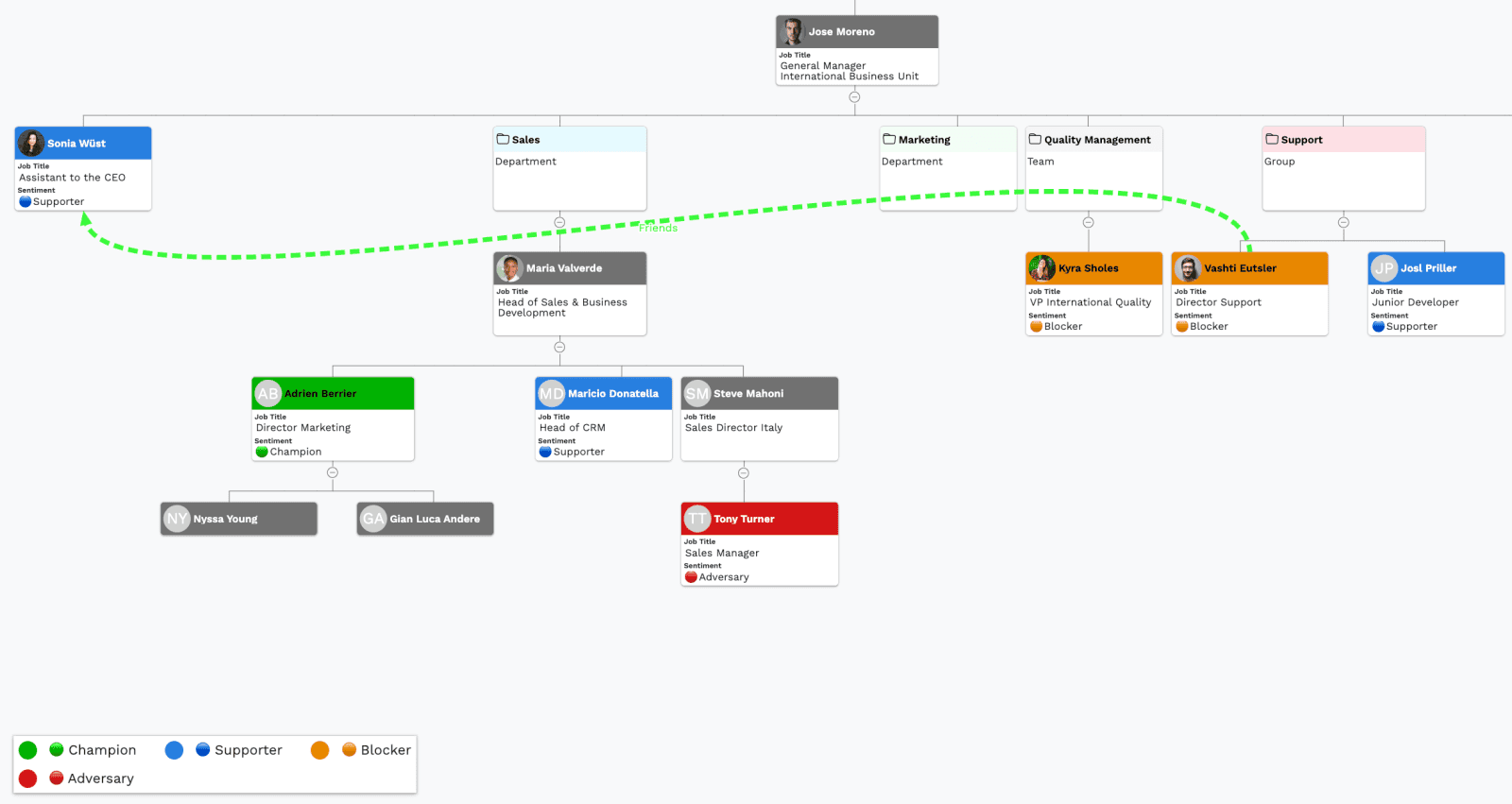
The practical version: on top of the hierarchy, draw a second layer of relationships that do not follow it. Who mentored whom. Who came from the same previous employer. Who the CFO actually calls before making a decision, as opposed to who reports to the CFO. Label those lines in plain language, "trusted advisor," "old colleague," "will be blamed if this fails," rather than in a taxonomy nobody remembers.
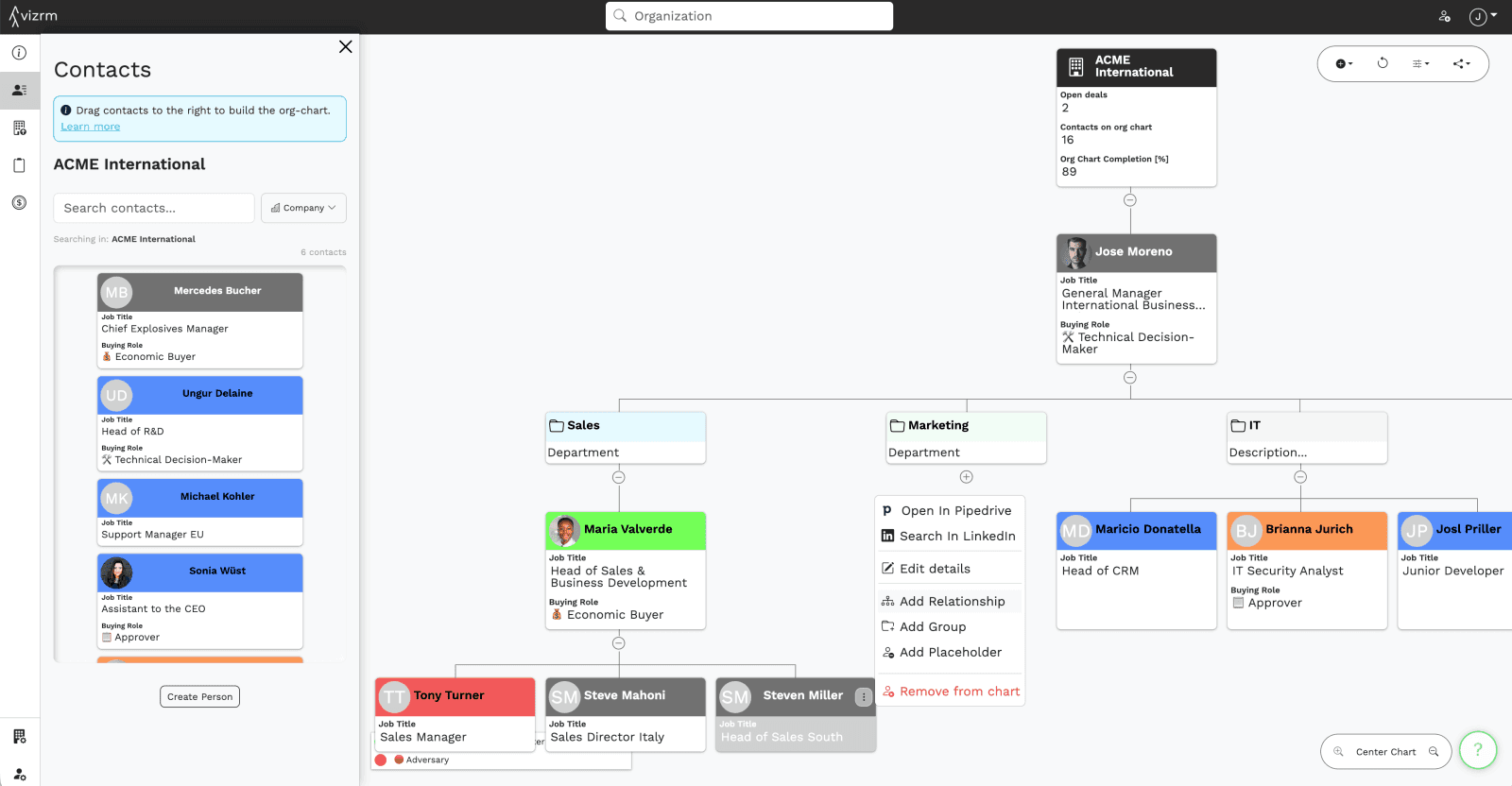
Alongside that, I track sentiment separately from role. Someone can be the economic buyer and lukewarm. Someone can be a junior end user and your loudest advocate. I keep it to a simple three-point scale, positive, neutral, negative, because a five-point scale invites reps to think about the scale instead of the person. The point is to be able to look at a chart and see that your entire positive sentiment sits in one department.
Where the information actually comes from
Nobody hands you the org chart. You assemble it from four sources, in roughly this order of reliability.
Discovery calls. By far the best source, and the most underused. The questions that work are specific and procedural rather than direct:
- "Who else will be looking at this before a decision gets made?"
- "Last time you bought something like this, how did it go through? Who had to sign off?"
- "Who would be unhappy if this changed?"
- "Who else feels this problem day to day?"
That third one is the highest-yield question in discovery, and almost nobody asks it. People will tell you who their blockers are if you make it a neutral question about the organisation rather than an implied criticism of a colleague.
Meetings and calls you are already on. Every name mentioned in passing is a lead. "I'll need to check with Sarah on the security side" is a stakeholder you did not know existed thirty seconds ago. Write it down in the moment. Most reps do not, and by the end of the week Sarah is gone.
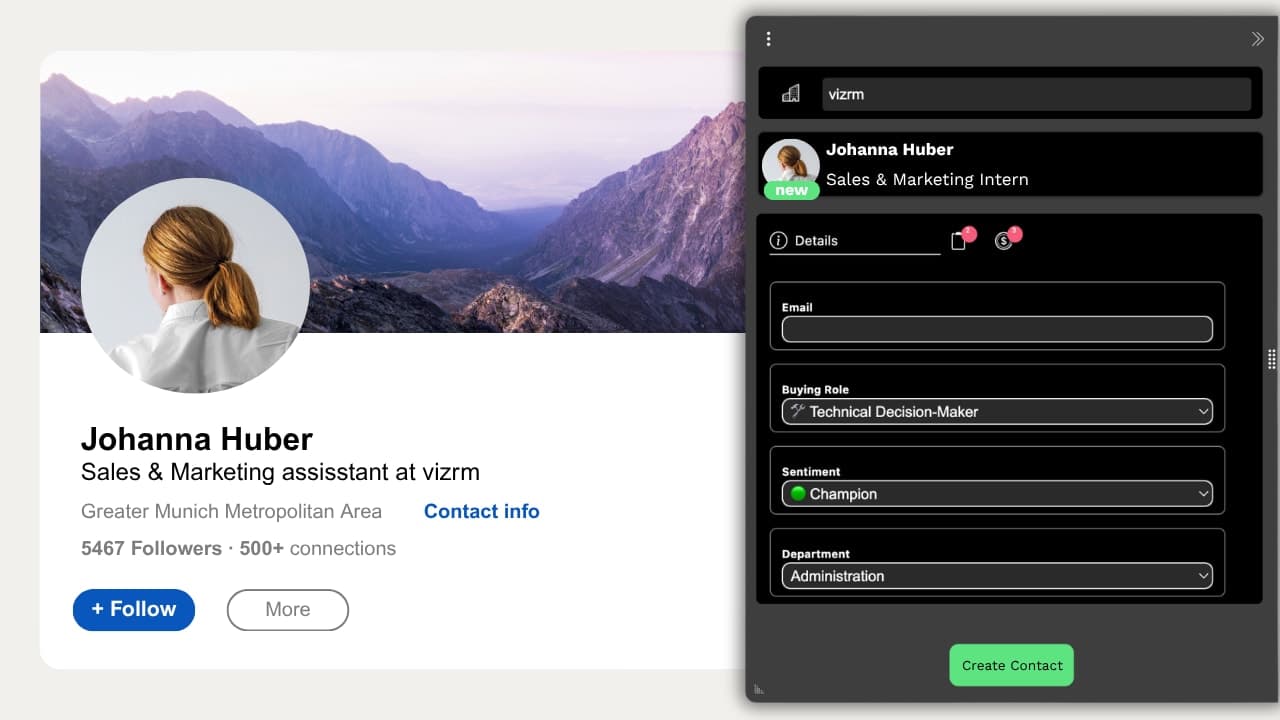
LinkedIn. Good for structure and titles, bad for influence. It tells you who exists and roughly where they sit. It does not tell you who matters. Treat it as the skeleton you then correct with what you learn on calls. The friction point here is real: if capturing a person from LinkedIn into the CRM takes eight clicks, reps will not do it, and the map stays at the four people you already knew. This is the specific job the vizrm browser extension does, and it is worth solving with whatever tool you use.
Your own CRM. Often better than people expect. Companies you have sold to before, contacts from marketing, people who attended a webinar two years ago. Most accounts have more contacts in the CRM than anyone has looked at.
Our customer Olivier built a repeatable five-phase system around exactly this, using market signals to decide which accounts deserve the effort in the first place. His approach is worth reading if you carry a large territory and cannot map everything.
Map the role before you know the name
The most common failure I see is a map that only contains people the rep has met. That map looks complete and hides the biggest risk in the deal.
If you are selling a system that touches customer data into a company of any size, someone in security or legal will review it. You may not know their name. That person still belongs on the chart, as a role with a question mark on it.
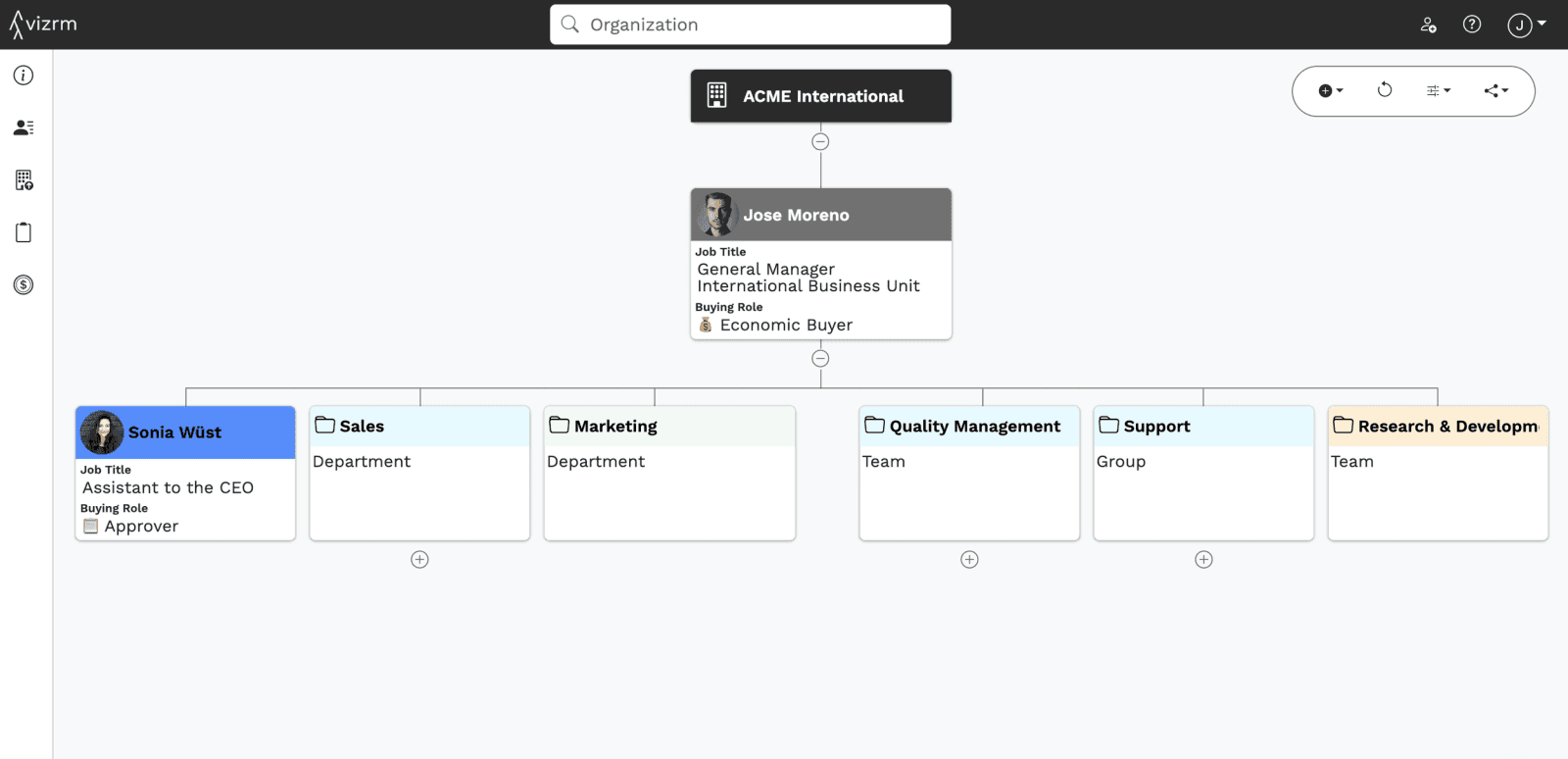
Doing that changes the conversation immediately. An account map with three named people looks fine. The same map with three named people and four empty boxes labelled "CFO, to identify," "security reviewer," "procurement," and "head of the team who will use this" is an obviously incomplete deal, and it tells you precisely what to do next. It also gives your manager something concrete to coach on rather than a general sense that the deal feels thin.
We built Placeholders for this, so you can hold the position on the chart without creating a fake contact record in your CRM. But the discipline works with a whiteboard. Draw the shape of the committee first, then fill it in.
The part everyone gets wrong: keeping it current
Here is the honest problem with account mapping. Almost every team can build a good map once. Very few have a map that is still true three months later.
The reason is structural. If maintaining the map is a separate task from selling, it does not get maintained. Nobody has ever been promoted for updating an org chart. The map decays, reps stop trusting it, and within a quarter you are back to a slide deck someone made for a QBR.
There are only two ways I know to fix this, and they are not really about tools.
Make updating it a side effect of work reps already do. If adding a contact to the map is the same action as adding them to the CRM, and logging a LinkedIn message is the same action as logging it as an activity, the map updates because people did their job. If it is a separate app with a separate login, it will not.
Give it a job in a meeting that already happens. The map has to be the thing you open in the deal review, not a document you prepare for it. Once a rep knows their manager will pull up the account map on Thursday, the map gets updated on Wednesday. That is not cynicism, it is just how process works.
This is why I am fairly insistent that the map belongs inside the CRM rather than next to it. Not because CRM-native is a nicer architecture, but because it is the version most likely to still be true in month three. Opteamis is the clearest example I have of this: five people, five separate personal org charts, none of them shared, until they moved into Pipedrive. Their case study covers what changed, including what happened when a rep left.
How to tell if it is working
Four signals, roughly in order of how early you will see them.
Your deal reviews get shorter. When everyone is looking at the same map, you stop spending the first ten minutes re-explaining who these people are.
You find gaps before the deal stalls. The moment you can see that your entire relationship with an account runs through one person in one department, you know what to fix. An engagement view over the map makes this visible without anyone running a report: the stakeholders nobody has touched in six weeks are simply a different colour.
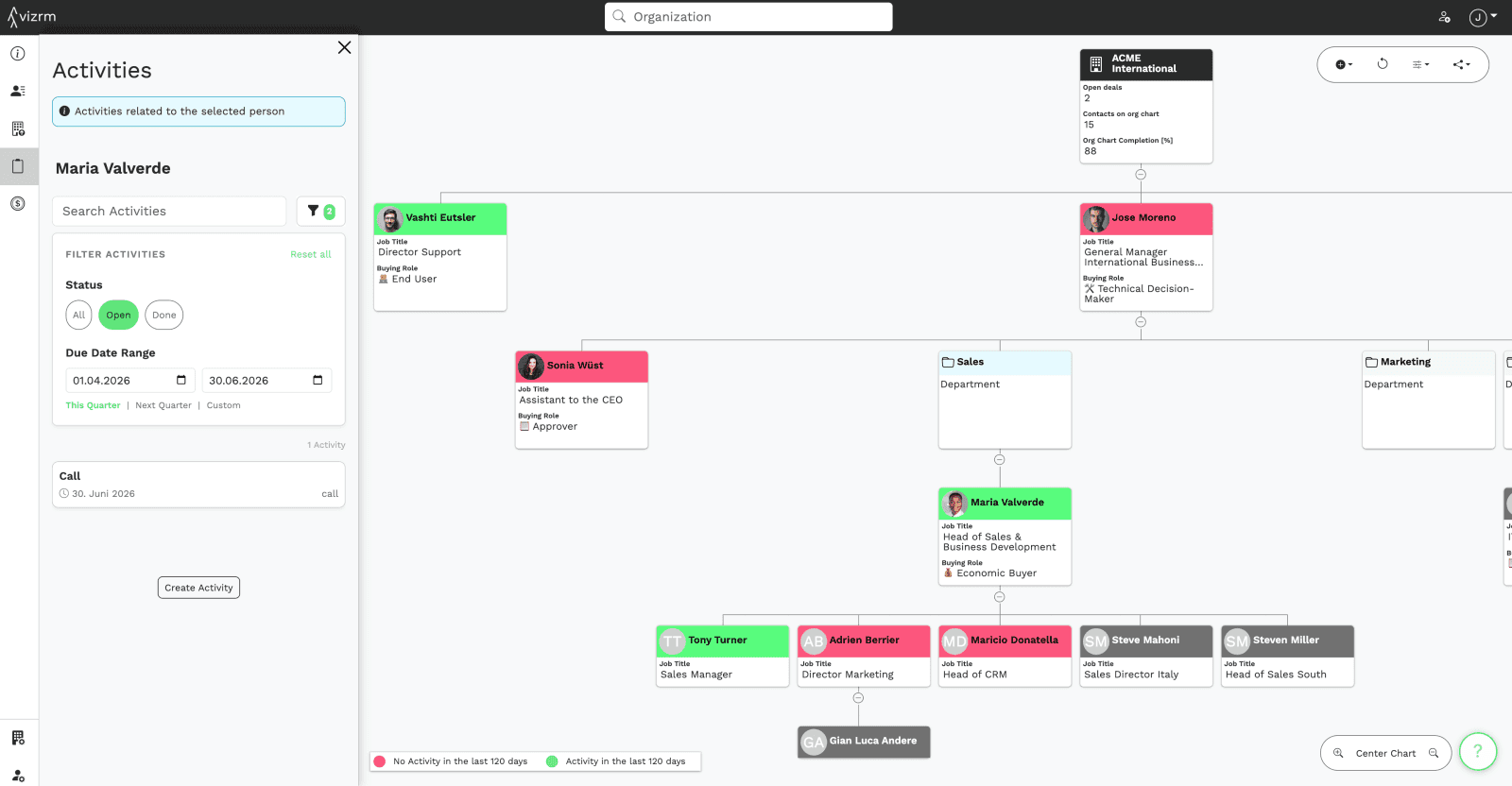
Handovers stop losing information. A rep leaves and the account knowledge stays. This is worth more than most teams price it at, and you only find out when it happens.
Forecast conversations change. "It feels good" becomes "we are single-threaded through the champion and have not met the economic buyer." That is a claim a sales leader can act on.
Where to build it
Briefly, because this is a sales problem more than a tooling one.
You can do this in a whiteboard tool. Plenty of good sellers do, and for two or three key accounts it is completely reasonable. The limits show up at scale and at handover: the map lives in one person's file, has no connection to your CRM data, and goes stale the moment it is finished.
The alternative is building it where your contacts and activity already live, so the structure and the engagement data are the same object. That is what we make: org charts and account maps inside HubSpot and Pipedrive, with the chart itself on the company or organization record.
Either way, the practice matters more than the tool. Map roles rather than titles, draw the influence lines as well as the reporting lines, put a placeholder where a name should be, and give the map a job in a meeting that already happens.
Frequently asked questions
What is account mapping in B2B sales? Account mapping is the process of identifying and visualising every stakeholder in a target account, including their role in the purchase, their reporting line, and their informal influence. It is how a sales team works out who needs to be engaged before a decision gets made, rather than after.
What is the difference between an org chart and an account map? An org chart shows formal reporting structure, who reports to whom. An account map adds the sales layer on top: buying roles, informal influence, sentiment, and which stakeholders you have actually engaged. The org chart is the skeleton; the account map is what makes it useful on a deal.
How many decision makers are in a typical B2B deal? Gartner puts a typical enterprise B2B purchase at six to ten decision makers. Gong's analysis of sales interactions found that closed-won deals include 67% more contacts than closed-lost deals, which is the clearest argument for mapping the committee rather than working a single contact.
How do you find the decision maker in a company? Ask procedurally rather than directly. "Last time you bought something like this, who had to sign off?" gets a more honest answer than "are you the decision maker?" Combine that with LinkedIn for structure and your own CRM for existing relationships, then correct your assumptions as you learn more on calls.
How do you map a buying committee you have not met yet? Map the roles first and the names later. If you know a security reviewer or a procurement contact will be involved, put that role on the chart as an unnamed placeholder. A map with visible gaps is more useful than a map that only contains the people you already know, because it shows you what to do next.
How often should an account map be updated? Continuously, as a side effect of selling, rather than as a scheduled task. Maps that require a separate maintenance step go stale within weeks. The practical test is whether adding a stakeholder to the map is the same action as adding them to your CRM.
Want to see this on a real account? Start a free 14-day trial and turn one of your own company records into a live account map. No credit card required.