
Tutorial: Transforming Pipedrive for Complex B2B Strategy
In this tutorial, we move beyond basic contact management. We are turning Pipedrive into a strategic engine that maps the "invisible" power structures of large organizations to help you win bigger deals, faster.
Step 1: The Account Mapping Foundation
Before adding fields, go to Settings > Data Fields > Person and create a group called "Account Mapping." Keeping account mapping data separate from contact data, such as e-mail & phone, ensures your team treats it as a strategic asset, not just more admin work.
Step 2: Identifying the Buying Role (The "Who")
A common mistake in B2B is assuming the person with the highest title is the one who matters most.
The Economic Buyer: This is the individual who benefits most economically from your solution. Warning: This is rarely the CEO. It’s the person whose budget is hit and whose KPIs are improved.
The Technical Buyer: Subject-matter experts brought in to evaluate specific niches such as IT security or compliance. They can’t always say "Yes," but they can definitely say "No."
User Buyer: Individuals who will use the solution and are concerned with usability and efficiency
The Approver: These roles (Legal, Procurement etc) are involved in the process but are not impacted by the solution itself.
Influencers: People who sway the decision from the sidelines, often in adjacent departments.
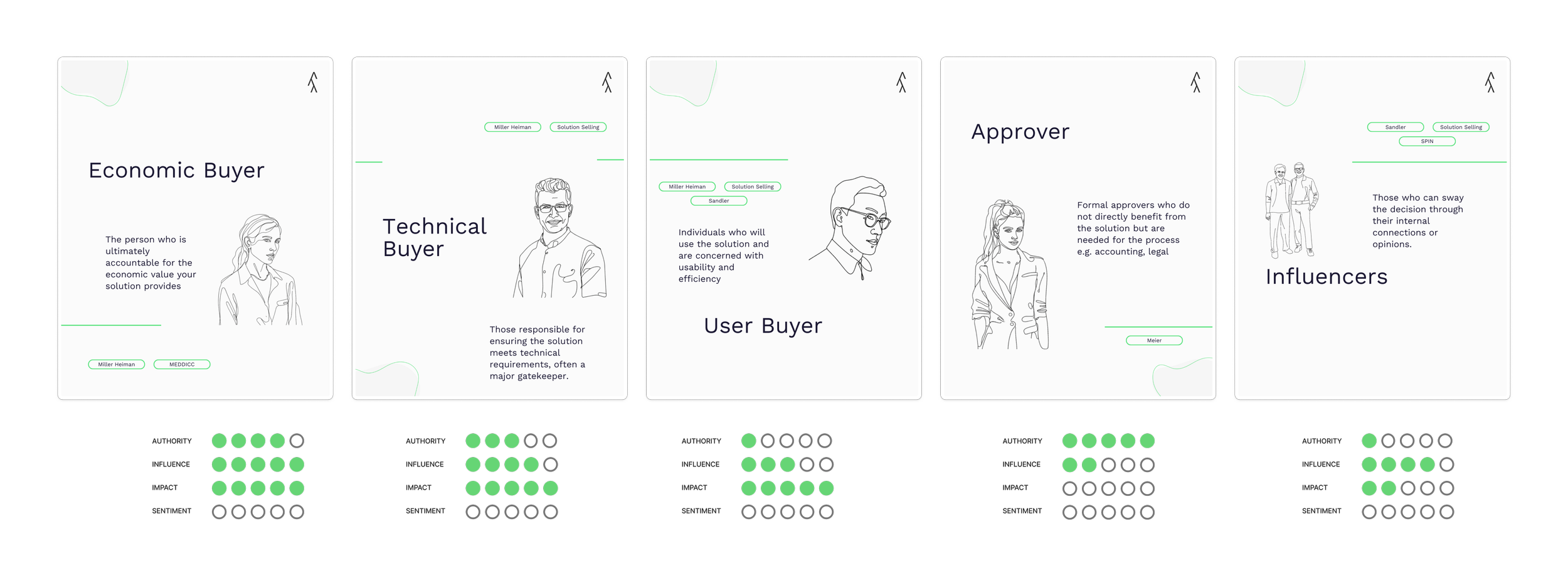
Typical Buying Persona Archetypes as they appear in sales literature
Step 3: Sentiment - The Pulse of the Deal
Frameworks like MEDDIC often call the "Champion" a role. In this setup, we treat Champion as a Sentiment.
Single-Value Checkbox: People generally have one stance on a deal at a time.
The Scale: Champion, Supporter, Blocker, Adversary.
The "Neutral" Logic: Do not add a "Neutral" option. If the sentiment is unknown, keep the field blank. This forces the sales rep to only input data when they have a clear signal, preventing "data clutter" and highlighting where you have relationship gaps.
Step 4: The Impact Field
This is the secret weapon for strategy derivation. Impact measures how much your proposal actually changes that person's daily life or work.
Scale of 1–3: 1 (Slightly), 2 (Impacted), 3 (Very Impacted).
Strategic Outcome: If your Economic Buyer is "Very Impacted" (3) but their Sentiment is "Blocker," your deal is in high-risk territory.
Step 5: Visualizing Power with vizrm
Data in a list is a spreadsheet; data in an org chart is a roadmap. By connecting Pipedrive to Vizrm, you unlock the full benefits of visual account management:
Identify Invisible Influence: vizrm allows you to map informal relationships (dotted lines) that go beyond the formal reporting structure. You can see who actually has the ear of the Decision Maker.
Transparency for Leaders: Instead of managers digging through 50 notes, they can see a color-coded sentiment map of the account instantly. This makes deal reviews 10x faster and more effective.
Seamless Handoffs: When a deal closes, the Customer Success team inherits a visual map of the "Champions" and "Blockers," ensuring the implementation starts with the right allies.
Real-Time Accuracy: Unlike a static PowerPoint chart or mind map, vizrm stays in sync with Pipedrive. If you update a role or sentiment in the CRM, it reflects on the chart immediately.